FairPath is Getting Better Every Week.
We ship new automation, compliance guardrails, and workflow improvements constantly. See exactly how the platform is evolving to protect your revenue.
Major product updates rolling out every month
Release cadence you can count on.
FairPath + Liberty: A Connected Pharmacy Fulfillment Workflow
FairPath now connects directly with Liberty to help pharmacy teams move patient requests from intake through medication review and fulfillment without losing context between systems.
Review and Fulfill Requests From One Workspace
FairPath brings the patient, medication, and request details together before pharmacy staff take action. Teams can review the request, confirm the correct patient and medication, and complete supported Liberty fulfillment steps from a guided workflow.
- Check Liberty for the correct patient and medication.
- Review refill eligibility and prescription details before submission.
- Send supported fulfillment requests without re-entering the same information.
- Preserve Liberty confirmation and delivery evidence with the original request.
- Route transfers and unsupported requests through a clear manual workflow.
- Prevent duplicate submissions when a request is reopened or retried.
- Preserve uncertain outcomes instead of assuming a request succeeded or failed.
- Keep manual actions, automated actions, and final outcomes visible to staff.
One Workflow for Transfers, Refills, and Immunizations
FairPath now gives pharmacy teams a shared workspace for reviewing prescription transfers, refill requests, and immunization appointments from intake through completion.
Turn Incoming Requests Into Organized Pharmacy Work
Instead of relying on disconnected forms, inboxes, and follow-up notes, pharmacy staff can see the original patient request, resolve the medication or appointment details, and record the next action in FairPath.
- Review the patient's requested medications in one workspace.
- Match refill requests to the correct medication and prescription.
- Identify requests that are not yet eligible and schedule the appropriate follow-up.
- Preserve a clear history when a request is completed or discarded.
- Offer scheduling based on pharmacy-specific availability.
- Route requests to the patient's selected pharmacy location.
- Capture explicit consent for scheduling-related text messages.
- Send appointment information with a downloadable calendar invitation.
Annual Wellness Visits, Organized From Outreach Through Follow-Up
FairPath now supports a structured Annual Wellness Visit workflow that helps care teams identify eligible patients, prepare for the visit, complete medication reconciliation, and coordinate follow-up work.
A Shared Workflow for the Entire AWV Process
Annual Wellness Visits require more than scheduling an appointment. FairPath gives the care team one place to coordinate outreach, preparation, documentation, medication review, and the work that follows the visit.
- Identify patients who may be ready for an Annual Wellness Visit.
- Coordinate outreach and scheduling from the patient workflow.
- Keep preparation tasks and outstanding information visible before the visit.
- Use one consistent process instead of disconnected reminders.
- Review the patient's medication list as part of the AWV workflow.
- Record discrepancies and questions requiring follow-up.
- Coordinate pharmacy and clinical review when needed.
- Preserve completed work and next steps with the patient record.
FairPath + Tebra: Less Manual Work for Care-Management Teams
FairPath now highlights Tebra/Kareo-connected workflows that help practices keep care-management activity, patient matching, documentation, billing follow-up, and sync visibility connected without forcing staff into repeated copy/paste, uploads, screenshots, and manual status checks.
Care-Management Workflows Connected to Tebra/Kareo
FairPath works alongside the practice management systems teams already rely on. Instead of asking staff to move every RPM, CCM, APCM, billing, and follow-up detail by hand, the integration keeps operational context closer to the care team.
- Reduce repeated uploads, screenshots, and copy/paste handoffs.
- Track whether documentation was prepared, sent, skipped, failed, or needs review.
- Give staff more time back for patient-facing work.
- Match the right FairPath patient to the right Tebra/Kareo patient and practice.
- Surface sync status, duplicate detection, and clear outcomes.
- Keep billing and payment follow-up closer to the care-management workflow.
Use FairPath Without a Remote Care Program
FairPath now supports patients who are not enrolled in RPM, RTM, CCM, APCM, or another remote care program. Practices can use FairPath as a patient outreach, AI automation, and workflow hub before, during, or completely outside formal care-program enrollment.
Start With the Patient, Not the Program
Many patients need outreach, reminders, education, and follow-up before they are ready for a billable care-management program. FairPath gives teams a shared place to coordinate that work without forcing every patient into a remote care enrollment path first.
- Coordinate reminders, follow-up, education, and engagement outside program enrollment.
- Give staff a shared patient workspace instead of scattered spreadsheets and inboxes.
- Keep the path open for RPM, RTM, CCM, APCM, or another program later.
- Use AI-assisted workflows for outreach, reminders, routing, and administrative follow-up.
- Connect EMR, billing, communication, documentation, and care-management work into one operational layer.
- Support patients who need attention even when no remote care program applies.
Tenovi Cellular Vitals & Fulfillment Engine
We have formalized our integration with Tenovi (Inc. 5000 #55) to solve the #1 friction point in RPM: device logistics. FairPath users can now order devices directly from the patient timeline, triggering drop-shipping directly to the patient's door.
Now Available in FairPath Inventory
We have enabled one-click ordering for the core chronic care suite. All devices are cellular-connected (no Wi-Fi setup required):
- Tenovi Cellular BPM (Blood Pressure)
- Tenovi Cellular Weight Scale
- Tenovi Cellular Glucometer
- Tenovi Smart Pillbox (Medication Tracking)
- Tenovi Peak Flow Meter (Respiratory)
"One-Click" Direct Fulfillment
Stop stocking inventory. When a patient is enrolled in FairPath, you simply click "Ship Device Kit." Tenovi handles the packaging, shipping, and tracking. The tracking number syncs back to FairPath automatically for audit proof.
"By unifying real-time clinical data with intelligent workflow, billing, and compliance automation, the partnership empowers providers, MSOs, and clinics to deliver higher‑quality chronic care at scale."— Nizan Friedman, PhD, CEO of Tenovi
2026 Code Support, Integrated Patient Education, and Precision Alerting
This release aligns FairPath with the 2026 CMS Physician Fee Schedule, introducing support for new RPM/RTM codes, a clinically vetted education library that turns content into auditable compliance events, and a refined alert hierarchy to eliminate alarm fatigue.
Patient Education System
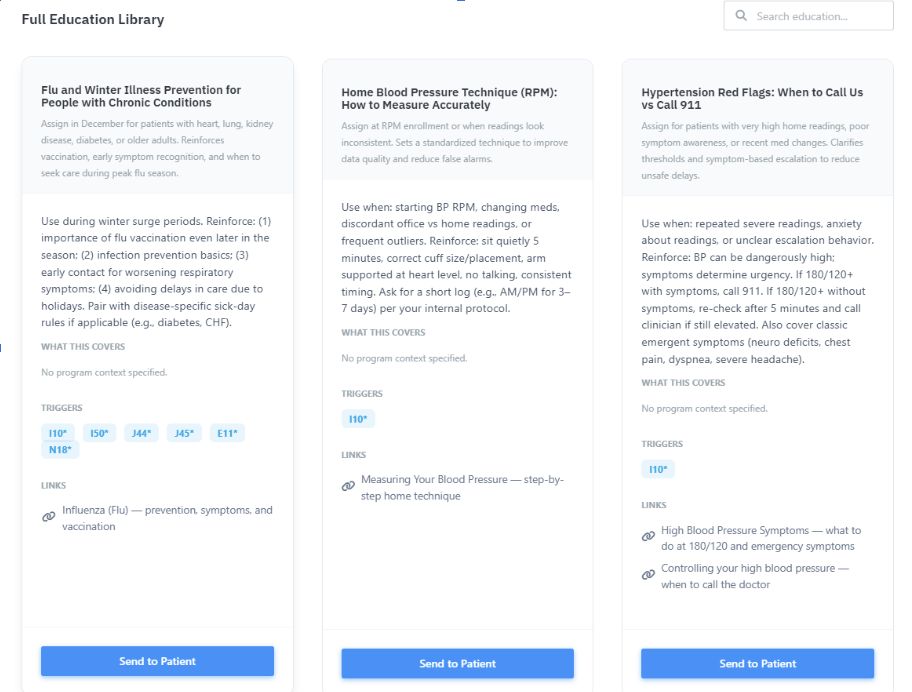
Education is no longer just a handout; it is a tracked clinical action. We have added a structured library of vetted content that allows clinicians to send education via SMS/Email with one click, automatically creating an audit trail for CCM and APCM time.
-
Curated Clinical Library: Pre-loaded "Starter Library" covering 20 common chronic conditions (e.g., Hypertension, COPD, CKD) plus seasonal topics like Flu Prevention. All content links to authoritative sources (CDC, NIH, FDA).
-
Audit-Ready Events: Every education item sent is logged as a distinct event in the patient timeline, supporting the "interactive communication" requirements for reimbursement.
Refined Alerting Hierarchy
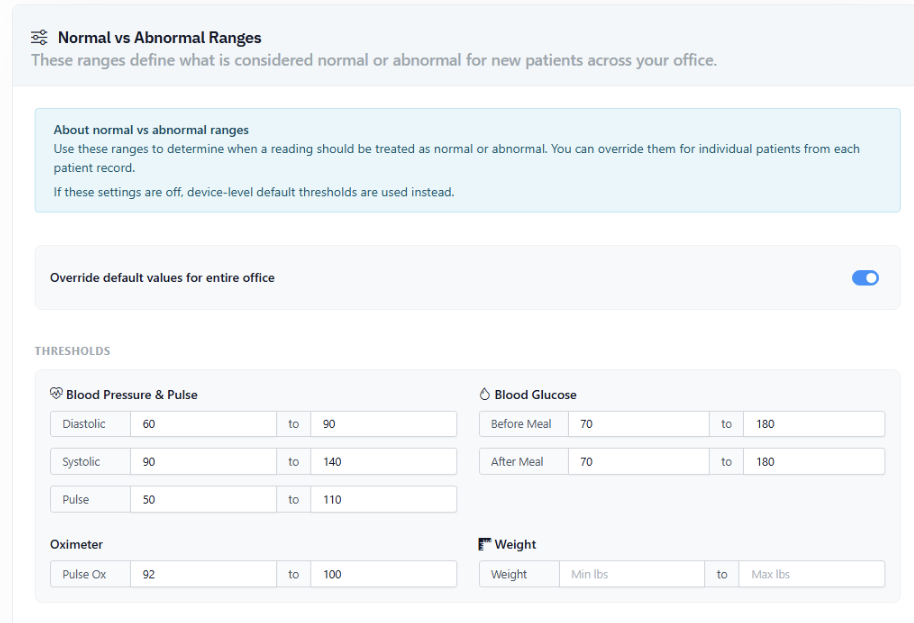
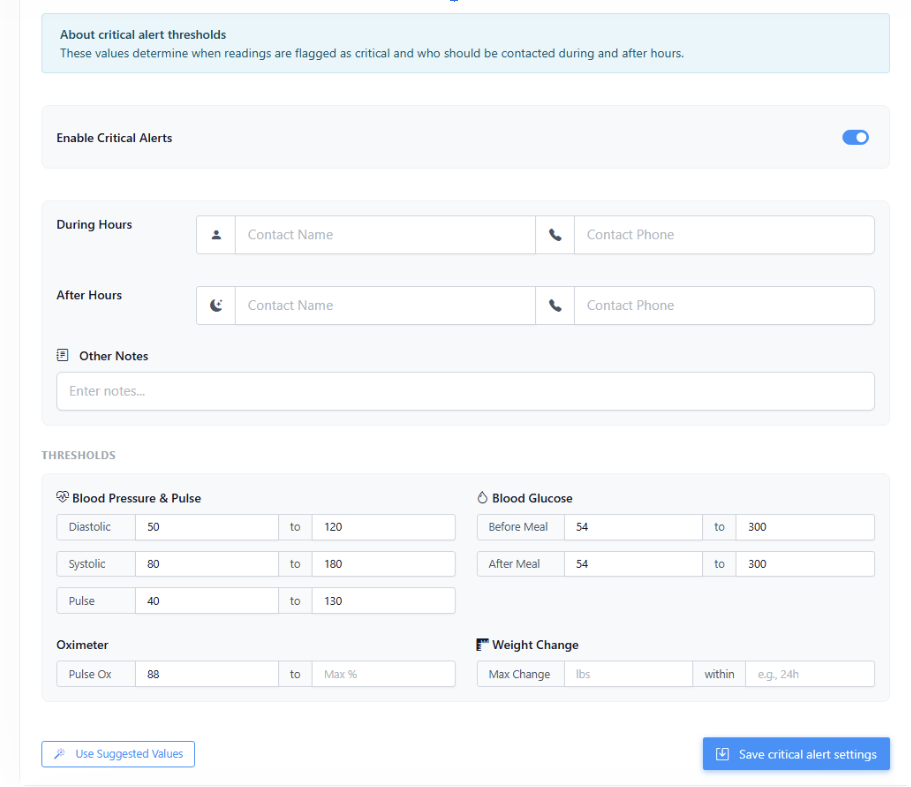
To combat "alarm fatigue," we have standardized how Abnormal and Critical alerts are triggered. The system now strictly follows a precedence model: Patient Override > Practice Setting > Device Default.
2026 Revenue & Workflow Updates
-
New RPM & RTM Codes: Full support for 2026 RPM codes (99445, 99470) and foundational logic for Remote Therapeutic Monitoring (RTM), including SaMD provisioning and duration-based tiers.
-
Concurrent Editing Safety: New "Collision Detection" alerts you if another team member is viewing or editing the same patient file, preventing accidental data overwrites during busy clinic hours.
-
Call Summary Notifications: Clinicians now receive an automated alert as soon as a patient call summary is transcribed and ready for review, speeding up response times.
Unified Review Queue, Amy AI Assistant Reviews, and a Dedicated Compliance Engine
This release upgrades the core operating loop: reviewers now work from one consolidated queue, and Amy--the AI assistant--can draft editable clinical review notes from Care Plans and Events, and a new Compliance Engine surfaces billing risk independently of code generation--so teams can see conflicts and requirements before submission.
Patient Workspace Upgrades
-
Phone Numbers and Time Zones: Patient profiles now clearly show phone details and time zone context to reduce outreach errors and improve coordination.
-
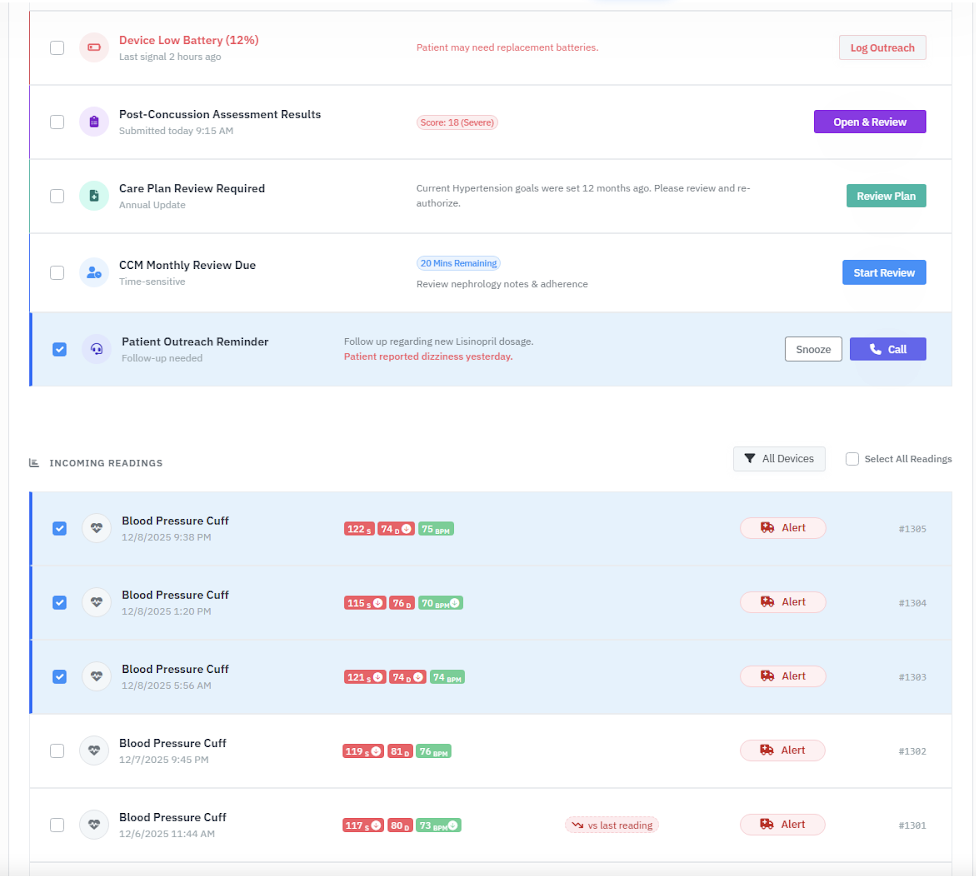
Consolidated Review Queue: All reviewable events now live in a single queue. It’s filterable, supports reviewing multiple items at once, and consolidates multi-review into a single event to reduce duplication and speed up throughput.
Amy “Magic Reviews”
Select the Amy button to generate an event review using the patient’s Care Plan and Events, then review, edit, and insert the note into the patient’s record. Reviewer-controlled
Patient Reminder Service
-
Practice-Level Configuration: The reminder service is configured per office in Settings so each practice can control outreach behavior.
-
Guardrails Before Sending: Reminders only send when patients are opted in, the number supports SMS (not landline), and the recipient isn’t blocked. Sent reminders are visible in both the SMS list and the event timeline.
New: Compliance Engine (Billing Safety)
The Billing Engine has been extended with a separate Compliance Engine that enforces and warns on billing rules. This makes claim risk explicit while keeping operational workflows fast.
-
99454 Device Days Enforcement: Enforces the requirement for 16 unique days of readings and surfaces deactivation-pending states.
-
99457 Patient Contact Requirement: Requires patient contact to achieve 99457; the UI surfaces this requirement directly on the achievement card.
-
Program Conflict Detection (APCM vs CCM): Detects conflicting enrollment in the same month and explains what’s happening so teams can correct course before submission.
-
Consent Guardrails: Flags missing consent across RPM, CCM, and APCM when required.
-
CCM Family Conflicts: Surfaces family-level conflicts to reduce denials and prevent incompatible combinations.
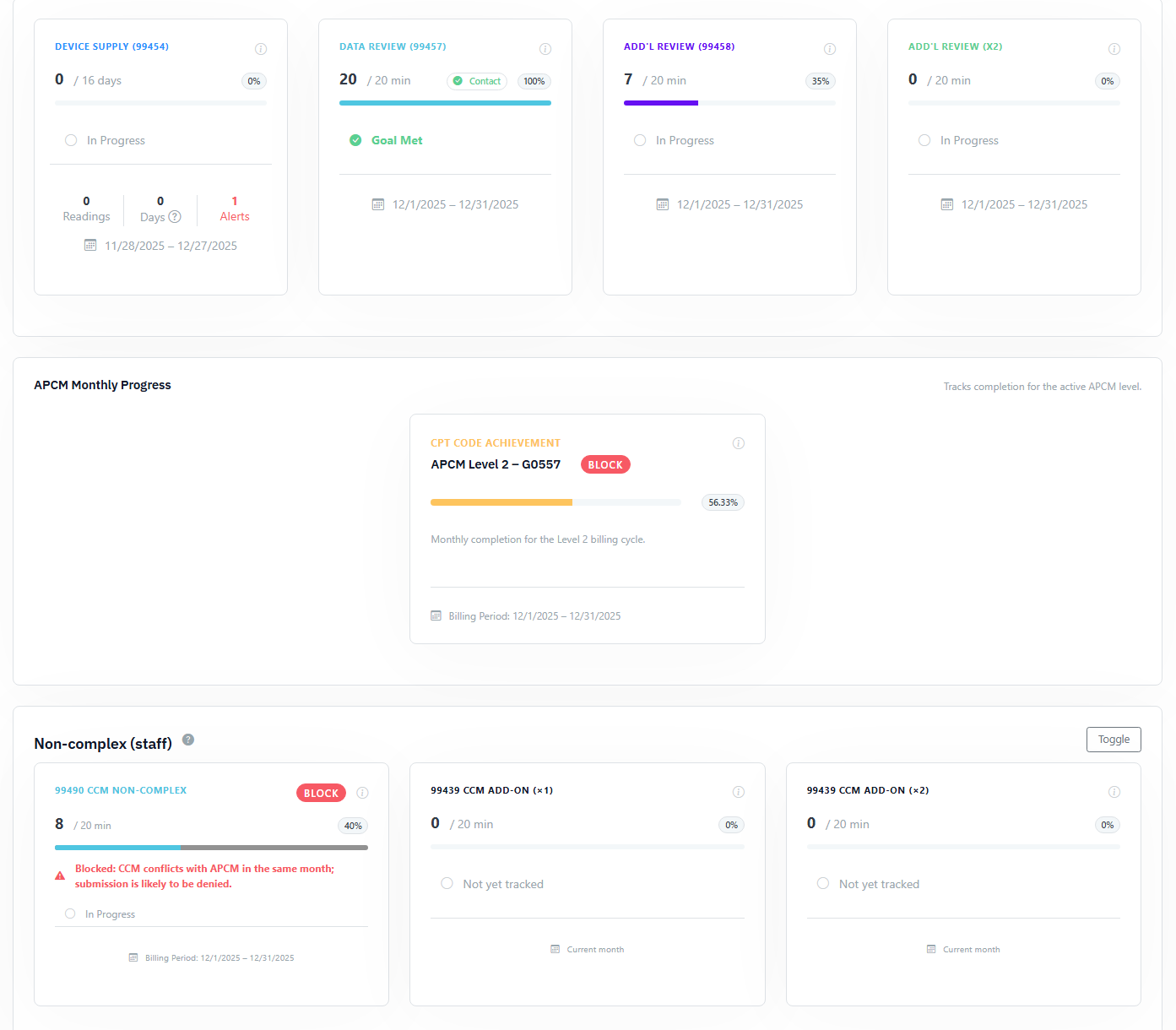
Important: Some scenarios now generate the codes while still warning on compliance risk--so the user can make an informed decision rather than having logic hidden or silently blocked.
Other Bug Fixes / Improvements
-
Patient Readings Grid: Improved layout (especially for larger notes), highlighted search terms, and added a Copy to Clipboard button.
-
Google Sheets: Attach Google Sheets directly to patient profiles for easy access to external data.
AI-Managed Care Plans for Multi-Condition APCM
Today’s release turns APCM into a true “panel-level” program: AI-managed CarePlans now handle multiple chronic conditions in a single workflow, automatically map eligibility across APCM, RPM, RTM, and CCM, and give patients a richer way to share what’s happening at home.
APCM Care Plan Automation
-
Multi-Condition AI CarePlans: Build one CarePlan that covers several chronic conditions at once. Amy combines each condition’s pathway with the patient’s chart to draft a unified APCM plan instead of separate, fragmented documents.
-
Automatic Program Eligibility Mapping: Chronic conditions are now auto-mapped to the programs they support--APCM tiers, RPM device monitoring, RTM therapy monitoring, and CCM--so reviewers can see exactly what each diagnosis unlocks before they code.
-
Library of Approved Pathways: CarePlans are built from a managed library of clinical pathways. You pick the conditions; FairPath assembles the right evidence-based content and keeps it consistent across the panel.
-
Review, Edit, Approve: Clinicians get a draft care plan they can tweak in-place, then formally activate for APCM documentation and audit support.
Richer Patient Messaging
-
MMS With Images: Patients can now attach photos directly to their messages (e.g., home logs, device screenshots, or wound images). FairPath stores them securely alongside the conversation thread for reviewers.
APCM Autopilot, AI Scribe, and Centralized Files
A major release focused on making APCM practical at scale and eliminating manual data entry for clinicians.
AI Voice Scribe
Staff can now dictate patient updates directly into the Admin portal. FairPath transcribes, auto-corrects, and logs the note for audit support. Beta
APCM Automation Upgrades
-
Automated Level Selection: FairPath now scans ICD-10 codes to automatically suggest the correct APCM level (G0556/57/58) based on condition count.
-
10-Point Requirements Tracker: Visual tracking for all monthly requirements. Includes "Amy" analysis and best-practice prompts for each item.
Platform Improvements
- Secure Patient Files: Store clinical docs and admin records directly on the patient profile.
- Role-Based Dashboards: Separate, optimized views for Billers vs. Clinical Reviewers.
Patient Workspace 2.0 & Smart CCM Coding
Redesigned to help reviewers see more, think less, and code correctly the first time.
Always-On Timer
Timer starts automatically upon opening a patient file and attaches to saved events. Zero missed minutes.
CCM Conflict Lock
The system now auto-detects and locks out conflicting code families in the same month.
Pinned Context
Demographics and last-month readings are now pinned to the top. No more tab switching.
Smarter Amy
Upgraded context window for better clinical analysis.
Care Plan Publishing & Persistent Notes
Making care plans more formal and notes more forgiving for real-world speeds.
- Formal "Publish" State: Clear separation between Draft and Active care plans.
- Dockable Note Window: Scroll through history while writing notes. The window follows you.
- Auto-Save: Notes persist even if you click away or lose connection.
See These Features in Action
Don't just read about it. Get a 15-minute tour of how these specific updates automate your workflow.
Request a Product Briefing